

Plateau
Know you're sitting level before you unhitch. Plateau tells you which corner is low and how many millimetres of block it needs, so you set up once instead of three times.
What's Inside / Module
The Vehicle Leveler
Plateau measures your rig's pitch and roll and turns them into something you can act on: a height for each corner, with the lowest corner at zero. Those numbers are your block heights. It puts them on the TrailCurrent CAN bus, so your dashboard shows them wherever you are standing.
Built from two stock boards and no custom PCB: the Waveshare ESP32-S3 RS485 CAN board running ESP-IDF, and a DFRobot 10-DOF sensor with a Bosch BNO055 on it. A ribbon cable joins them, a Deutsch DTM 4-pin brings in power and CAN, and the whole thing lives in a two-piece 3D printed case with the sensor's axes marked on the lid.

At a Glance
What's inside the case and what comes out of the connector.
Compute
Waveshare ESP32-S3 RS485 CAN board. Dual–core Xtensa LX7 running C on ESP-IDF, with an on-board CAN transceiver and USB-C for flashing. 16 MB flash with two OTA slots, so an update that fails rolls back on its own.
Sensor
DFRobot SEN0253 with a Bosch BNO055 on I2C. Plateau reads it every half second and works out pitch, roll, and the height difference front to back and side to side from your rig's length and width.
Vehicle Network
500 kbps CAN through the board's on-board transceiver,
out to a Deutsch DTM 4-pin. Tilt and per-corner heights go out
at about 30 times a second on 0x37 and
0x38, with a status frame every two seconds.
Bill of Materials
Everything you need to build one Plateau, top to bottom.
Some source links are affiliate links (Amazon, Waveshare). They cost you nothing extra and send a small cut back to the project.
| Qty | Part | Description | Source |
|---|---|---|---|
| 1 | Waveshare ESP32-S3 RS485 CAN Board | ESP32-S3 dev board with an on-board isolated CAN transceiver, USB-C, and a 7–36 V input, so it runs straight off the rig's 12 V. Off-the-shelf. | Waveshare |
| 1 | DFRobot SEN0253 Gravity 10-DOF AHRS | Bosch BNO055 motion sensor on a small board, I2C at address 0x28. The pressure sensor on the same board is not used. | DFRobot |
| 1 | 20-pin IDC Ribbon Cable (2×10) | From the Waveshare board's user header to the sensor. Only four wires are used: 3.3 V, ground, SDA and SCL. | Generic |
| 1 | Deutsch DTM04-4P Connector | 4-pin receptacle carrying 12 V power and the CAN H / CAN L pair. The TrailCurrent standard for vehicle bus interconnects. | Amazon |
| 1 | Deutsch W4S Wedgelock | The orange lock that holds the pins in the DTM04-4P receptacle. | TE Connectivity |
| 1 | Case Bottom | 3D printed. 123 × 80 × 26 mm including the mounting tabs, with standoffs for both boards and an opening in one end for the DTM 4-pin. ABS. | 3D printed (see below) |
| 1 | Case Cover | 3D printed. 123 × 58 × 7 mm. Raised X, Y and Z axis markings sit directly over the sensor chip. ABS. | 3D printed (see below) |
| 4 | M2.5 × 6 mm Machine Screws (boards) | Two hold the Waveshare board and two hold the sensor board to the standoffs in the case floor. Stainless or zinc-plated. | Hardware store |
| 4 | M2.5 × 10 mm Machine Screws (cover) | Secure the cover to the case bottom at the four corners. Stainless or zinc-plated. | Hardware store |
Technical Drawings
Orthographic views of the full assembly, straight out of the FreeCAD model.
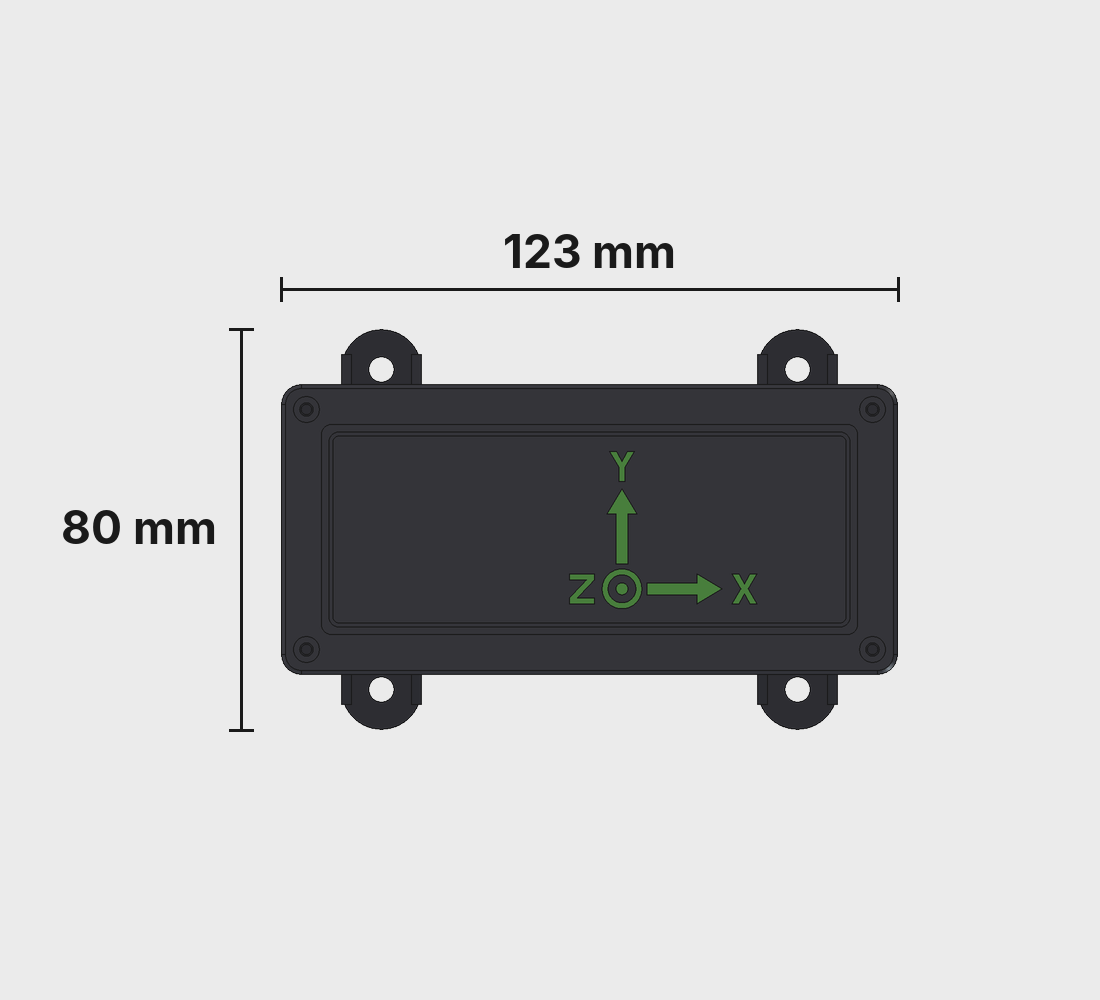
Top View
The X, Y and Z markings sit right over the sensor chip, so you can see which way it faces when you mount it. Four mounting tabs on the long sides.
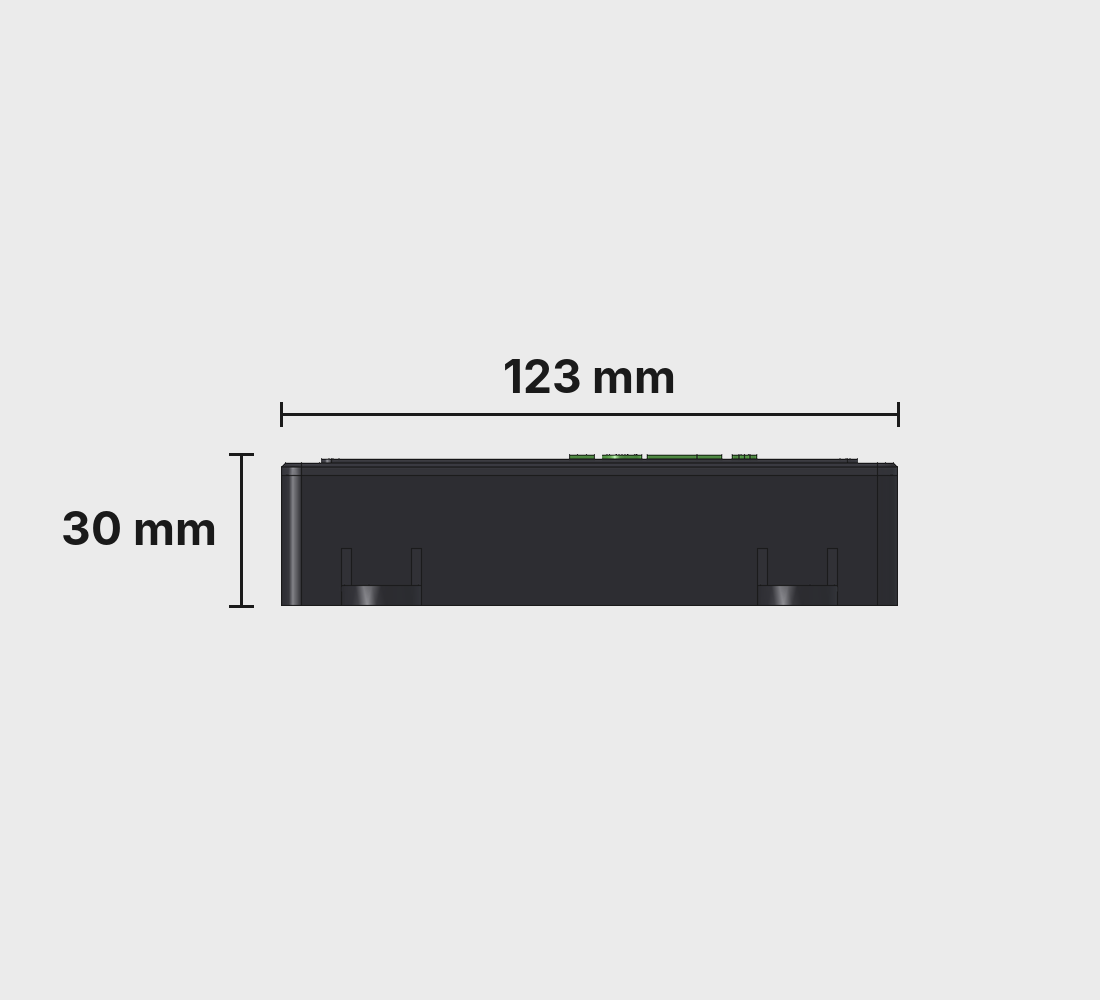
Long Side
30 mm tall, so it fits on a floor, against a wall, or under a cabinet without getting in the way.
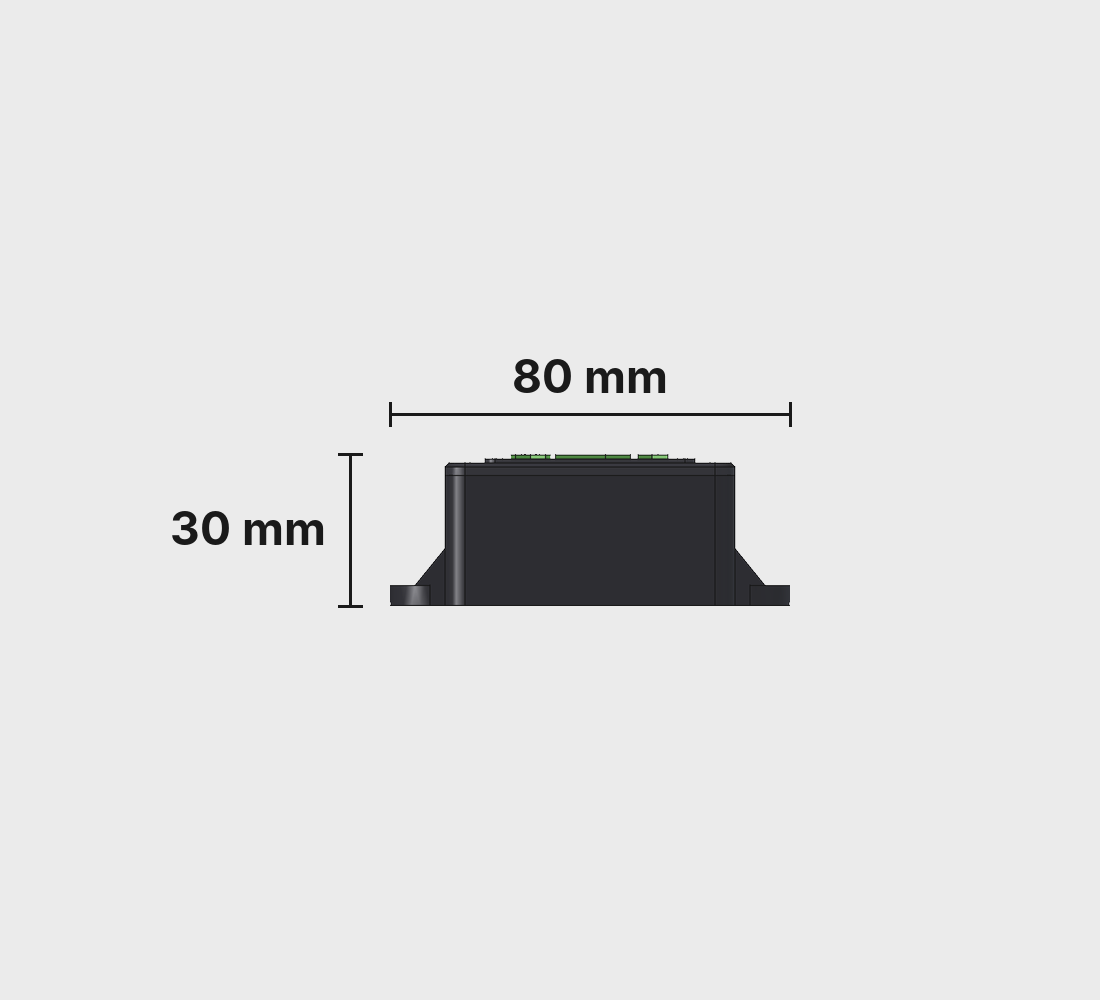
Plain End
The closed end. The mounting tabs and their gussets sit at the case floor so the screws go straight down into whatever you mount it on.
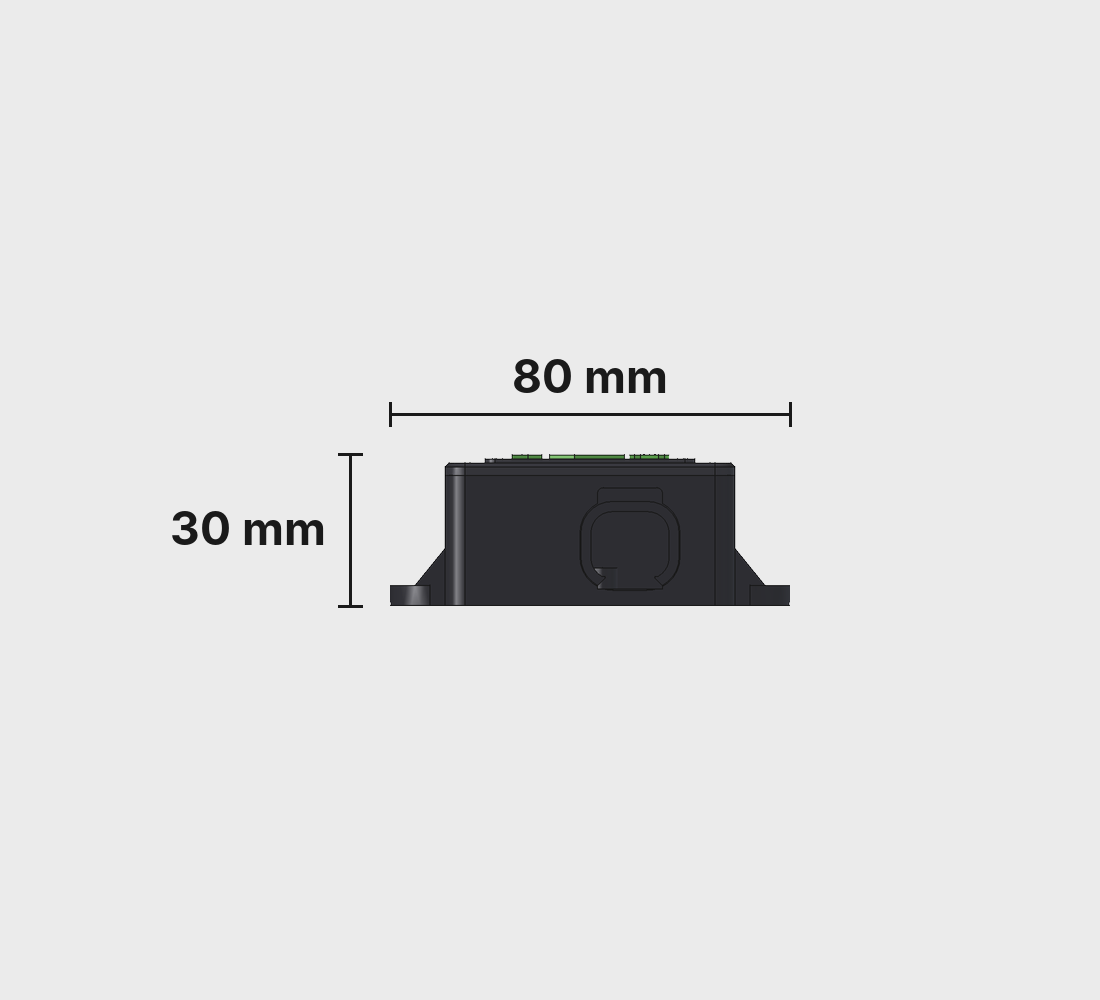
Connector End
One Deutsch DTM04-4P for 12 V and CAN. That is the only cable Plateau needs.
Overall dimensions: 123 × 80 × 30 mm. Source CAD lives in the CAD folder of the Plateau repo.
3D Printed Parts
Two pieces, printed in ABS. The STL files are in the CAD folder of the repo, next to the FreeCAD source if you want to change them to suit your rig.

Case Bottom
The main body. Standoffs in the floor hold the Waveshare board and the sensor board, one end frames the DTM 4-pin, and four braced tabs let you screw it to a floor or a wall.
- Dimensions: 123 × 80 × 26 mm
- Material: ABS
- File:
BodyPlateauCaseBottom.stl

Case Cover
The lid. A raised panel carries the X, Y and Z markings, lined up with the sensor underneath. Four counterbored holes take the cover screws.
- Dimensions: 123 × 58 × 7 mm
- Material: ABS
- File:
BodyPlateauCaseCover.stl
Hardware
Two off-the-shelf boards and a ribbon cable. No custom PCB, no soldering on the boards.
MCU Board
Waveshare ESP32-S3 RS485 CAN board. ESP32-S3 with 8 MB of PSRAM and 16 MB of flash, split into two OTA slots so updates land on the inactive half. The RS485 transceiver on the board is not used.
Power
12 V comes in over the DTM 4-pin and lands on the board's screw terminals, which take anything from 7 to 36 V. The sensor runs from the board's 3.3 V rail through the ribbon cable.
Motion Sensor
The BNO055 calibrates itself as you move it. Once it is calibrated, Plateau saves those numbers to flash on request and switches to reading the accelerometer alone, which is the steadiest way to read tilt on a parked rig.
Three Ways to Mount It
Flat on the floor, or on the left or right wall. Tell Plateau which one and it remaps the sensor's axes, so pitch is always front to back and roll is always side to side.
Assembly
Two boards, eight screws, one connector. An afternoon, including the print.
-
1
Print the case
Grab
BodyPlateauCaseBottom.stlandBodyPlateauCaseCover.stlfrom the CAD folder and print both in ABS. -
2
Flash the firmware
On the bench, plug the Waveshare board into USB-C and flash Plateau straight from your browser with the TrailCurrent Flasher. After that, updates come over the air.
-
3
Mount the Waveshare board
Set it on its two standoffs along the long wall and fix it with two M2.5 × 6 screws.
-
4
Mount the sensor
The DFRobot board goes on the other two standoffs with two more M2.5 × 6 screws. It sits flat and square to the case, which is what makes the readings line up with the markings on the lid.
-
5
Run the ribbon
Plug the IDC ribbon into the board's user header and land wires 1, 3, 13 and 15 on the sensor's 3.3 V, ground, SDA and SCL. The wiring diagram below has the details.
-
6
Fit the connector
Press the DTM04-4P into the end wall and lock its pins with the wedgelock. Run 12 V, ground, CAN H and CAN L to the board's screw terminals.
-
7
Close the case
Drop the cover on and secure it with four M2.5 × 10 screws at the corners. Snug, not cranked down.
-
8
Mount it and tell it about your rig
Screw it to the floor or a wall, square to the rig, and plug in the DTM 4-pin. In Headwaters, set which way it is mounted and your rig's length and width. Plateau saves them and starts reporting corner heights.
Wiring
Four wires on the ribbon. Power and CAN land on the screw terminals.
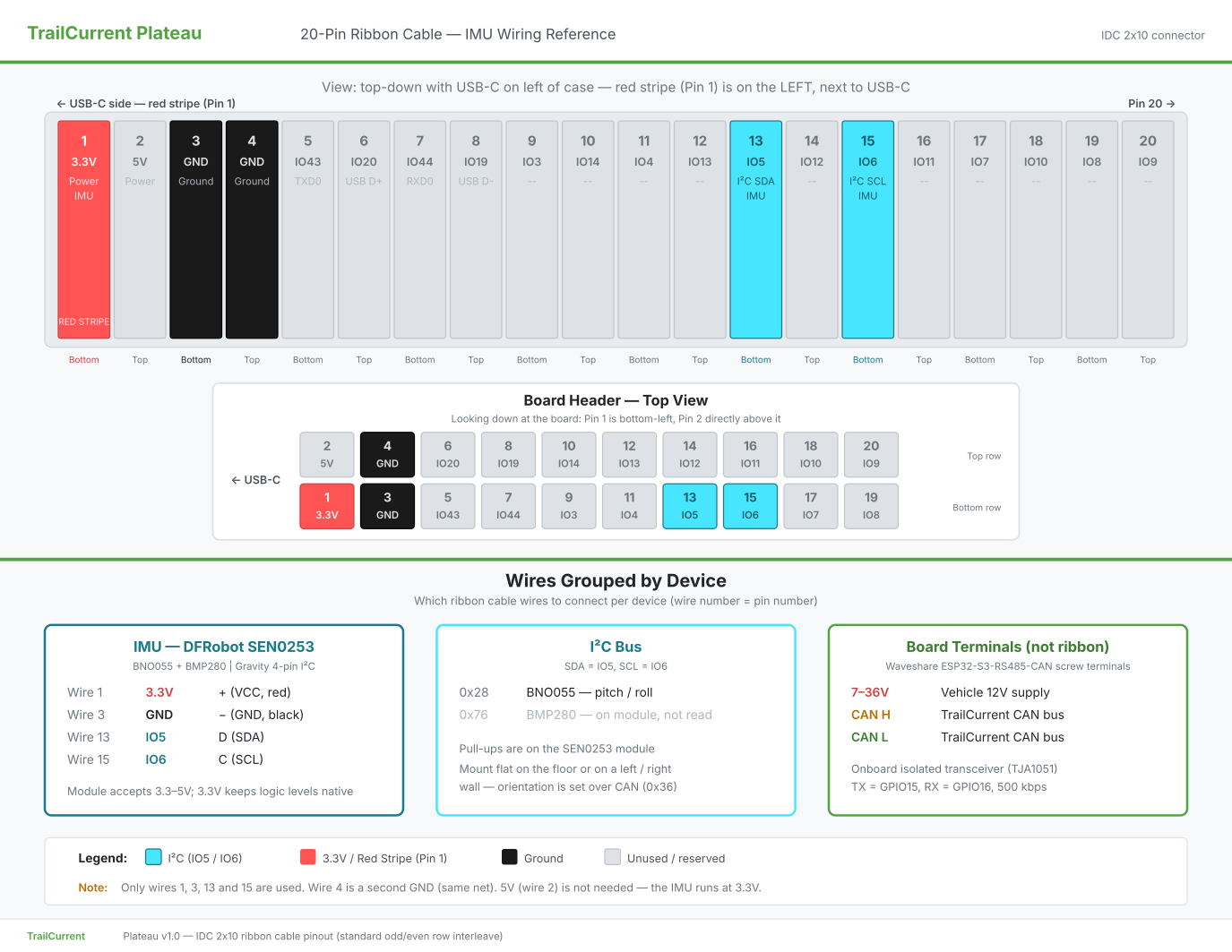
| IDC Pin | GPIO | Function |
|---|---|---|
| 1 | None | 3.3 V to sensor VCC |
| 3 | None | Ground to sensor GND |
| 13 | 5 | I2C SDA |
| 15 | 6 | I2C SCL |
CAN TX and RX are GPIO 15 and 16, wired to the board's own transceiver, so there is nothing to connect for them. CAN H, CAN L and 7–36 V go to the screw terminals.
CAN Protocol
Three outbound frames, one inbound config frame, plus the bus-management IDs every TrailCurrent node speaks.
| ID | Name | DLC | Payload |
|---|---|---|---|
0x37 |
Tilt Data | 8 | Pitch and roll in hundredths of a degree, then the front-to-back and side-to-side height differences in millimetres. Four signed 16-bit values, big-endian. |
0x38 |
Corner Heights | 8 | How far to raise front-left, front-right, rear-left and rear-right, in millimetres, with the lowest corner at zero. Four 16-bit values, big-endian. |
0x39 |
Status | 4 | Sensor connected and saved-calibration flags, the BNO055's four calibration levels packed into one byte, and the mounting orientation. Every two seconds. |
0x36 |
Leveling Config (RX) | 1–7 | Command byte first. 0x01 sets mounting, rig length and width in centimetres, with an optional save to flash. 0x02 asks for status. 0x03 saves the sensor calibration. |
0x04 |
Version Report | 6 | Sent once at boot: last three MAC bytes and firmware major / minor / patch. |
0x00 |
OTA Trigger (RX) | 3 | Last three MAC bytes of the target device. If it matches, Plateau joins WiFi and serves an HTTP upload endpoint for the new firmware. |
0x01 |
WiFi Config (RX) | variable | Chunked SSID / password provisioning stored in NVS. |
0x02 |
Discovery (RX) | 0 | Broadcast trigger for mDNS self-discovery so Headwaters can find the module on its own. |
Block Heights, Not Angles
Angles are hard to act on with a stack of blocks in your hand. The corner frame does the trigonometry for you and shifts the numbers so the lowest corner reads zero. What is left is how much to add under each of the others.
OTA and Discovery as Tasks
Firmware updates and discovery run as their own tasks, so the CAN task keeps reading the sensor and sending frames while either one is going. They never run at the same time.
Settings That Stick
Mounting, rig size and sensor calibration all live in flash. Pull the power at the end of a trip and Plateau comes back exactly as you left it.
Build Your Own Plateau
Every file is in the repository: the FreeCAD enclosure, the ESP-IDF firmware, the CAN protocol and the wiring diagram. Fork it, build it, make it yours.