
Less than two weeks ago we put a working Capstan dial on its product page, so you could turn it and press it before deciding whether you wanted one. Today Milepost joins it, and this time it comes with a whole travel trailer. Tap the screen on the kitchen wall, switch on the water pump, and watch the faucet run. It is the start of something we plan to keep building: a way to experience TrailCurrent right here on the website, before you spend a dollar or a weekend on hardware.
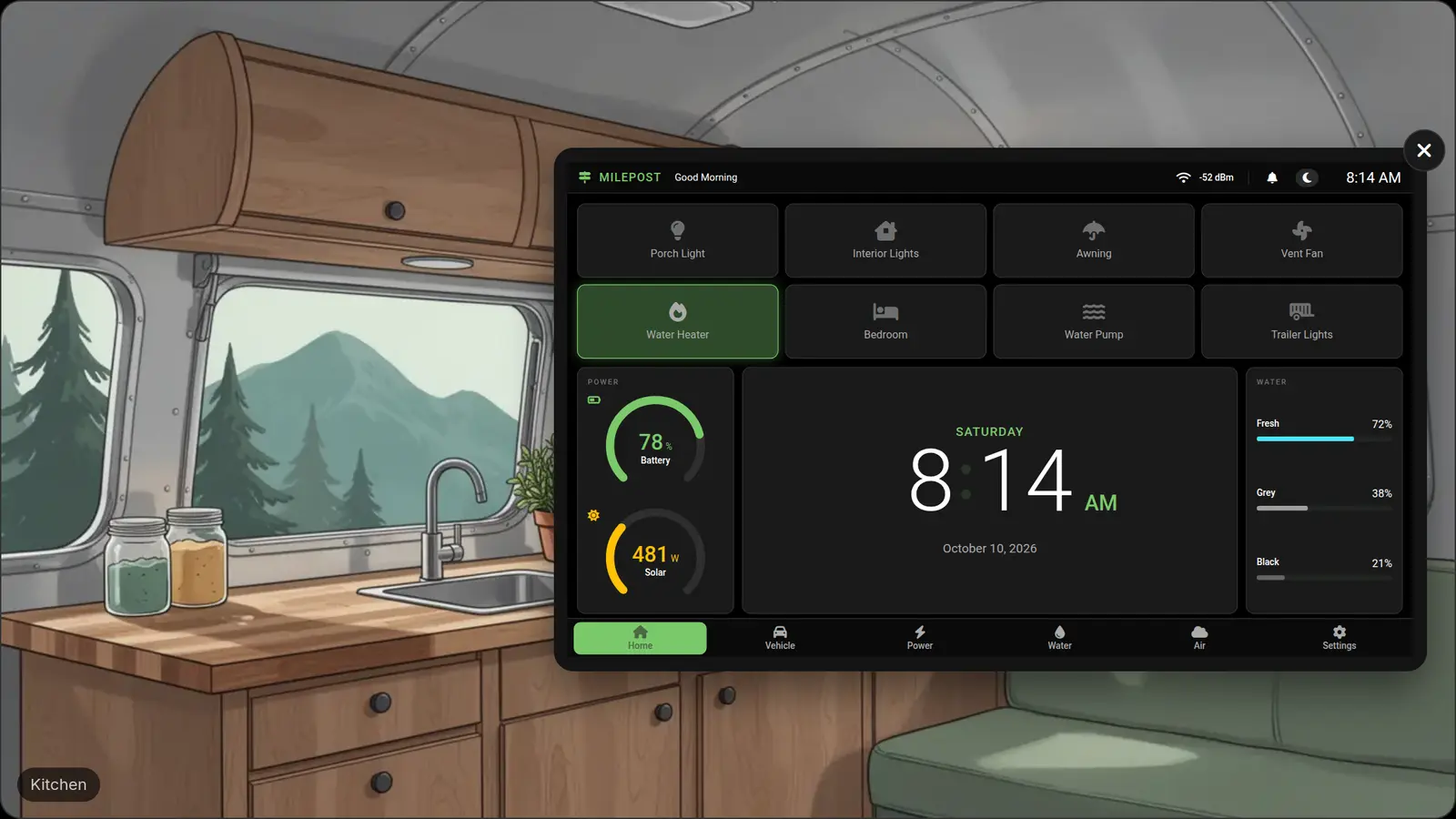
Both are live now. Try Milepost in the trailer, or turn the Capstan dial on its product page. They work on a phone, a tablet or a laptop, with nothing to install and nothing to sign up for.
Why we built this
A TrailCurrent system is something you put together yourself. The designs and the software are free, but the parts are not, and neither is your time. Photos and feature lists only get you so far. What you really want to know is simpler. What is it like to live with? Does the screen make sense at a glance? Can you find the water tanks without hunting for them? Would everyone else in the rig figure out the porch light on their own?
Now you can answer those questions yourself, before you have spent anything on it.
The real screens, not a mockup
What you see in these demos is the same interface that runs on the physical devices, pixel for pixel. Same layout, same icons, same colours, same menus in the same places. If a screen looks a certain way here, it looks that way on the wall of your rig.
That matters to us. A polished mockup can make any product look easy, and a demo that drifts from the real thing is just a nicer kind of brochure. We would rather you judged the screens you would actually be living with.
What you can do in the trailer
The Milepost demo puts the 7-inch wall screen inside an illustrated travel trailer with a kitchen, a living space, a bedroom and an outside. The trailer answers when you switch things on.
- Run the water. Turn on the water pump and the kitchen faucet runs. On the Water tab, the fresh tank drops while the grey tank fills.
- Level the trailer. Step outside and the campsite slopes, so the Vehicle tab reads Not Level. Add blocks under a wheel and crank the tongue jack until both bubbles sit in the middle.
- Wait for dark. Switch to night and the solar falls to zero. Turn on the porch and awning lights and see what that costs your battery on the Power tab.
- Clear the air. Head to the living space, turn on the vent fan, and check the Air tab.
- Make it yours. Switch between light and dark, and between Fahrenheit and Celsius.
The readings are simulated, but they behave like the real thing. The clock keeps your local time, the solar follows the sun, and the battery charges or drains with whatever you have switched on.
And the dial next door
Capstan was first. On its product page the dial works the way the real one does: turn the ring, press to choose, hold to go back. Find Climate and dial in a temperature, switch the awning light, or open the entry door and watch the alert take over the whole screen.

Being straight about what you are looking at
The scenes are examples. They show one trailer set up one way, so you can get a feel for how TrailCurrent works day to day. They are not a complete list of what TrailCurrent can do, and they are not a promise of what your own rig will look like.
Some of what you see depends on what is already in your rig, or what you add to it. A few examples:
- The fridge. The fridge drawing power in the background is a 12-volt fridge. If yours runs a different way, it will not show up in your power readings the same way.
- The water heater. The Water Heater tile assumes an electric water heater that TrailCurrent can switch on and off.
- The thermostat. Thermostat controls only mean something if there is a heater for them to switch, such as an electric heater. And as we said when Capstan launched, its Climate screen shows the real inside temperature today but does not change your heat or air conditioning yet. The thermostat control it will talk to is still being built.
Every rig is different, so yours will have its own set of devices, with its own names. If something you care about is not in the scene, that does not mean TrailCurrent cannot do it. Ask us on Discord and we will tell you plainly.
Where this is going
Capstan and Milepost are the first two, and we are not stopping there. The goal is a rig you can walk through on this website and use every device TrailCurrent supports, exactly the way it works in the real world. Every screen, every switch, every reading. As new modules become real, they will show up here, and the trailer will fill in over time.
We will say so on the blog each time something new lands, so you will not have to go looking for it.
Free to try, free to build
TrailCurrent has three goals. Build a real open source Software Defined Vehicle platform. Give it away. Teach others to do the same. These demos sit right in the middle of the second one: you should be able to see exactly what you are getting before you invest in it.
When you are ready to go further, everything behind these screens, the designs, the software and the instructions, is free and open source on GitHub. You build it yourself, mostly from off-the-shelf parts, at your own pace.
Go try Milepost, turn the Capstan dial, and when you are ready, see how to get started. More of the build goes up on the open source channel.