
From the very first module, TrailCurrent was designed as one experience, not a collection of gadgets. The wall screen, the dial, your phone, the TV, the speaker you talk to and the screen you take outside are all meant to feel like the same rig, because they are. That is easy to say and hard to picture, so we built a way to see it. The demo on the website is now a whole travel trailer with six TrailCurrent devices in it, and they all work together.
Live now. Try TrailCurrent works on a phone, a tablet or a laptop, with nothing to install and nothing to sign up for. It is also the first thing you see on the home page.
Where this started
TrailCurrent started in our own trailer, with a phone full of apps. One app for the solar panels and the battery. A little sensor on the wall that tracked temperature and humidity, with an app of its own. A switch panel by the door for the lights and the water pump. And a leveling gadget, with yet another app, to tell us whether the trailer was sitting flat.
Every one of them did its job. None of them knew the others existed. Checking on the rig meant opening four different apps, each with its own look and its own way of doing things. Turning on the water pump meant walking over to the panel. There was no single place to see how the rig was doing, and no way for one piece to help another.
So we asked a simple question. What if it was all one system? One place where the battery, the air, the lights, the water and the level live together, so any screen in the rig can show all of it and switch any of it.
That is TrailCurrent today. The same jobs still get done: watching the solar and battery, the temperature and humidity, switching the lights and the pump, checking the level. But now the modules that do those jobs work together, and instead of four apps you have one rig you can reach from the wall, the dial, your phone, the TV, or just by asking.
That change is hard to get across with a list of parts. It clicks the moment you see it, which is exactly what the trailer is for.
What we mean by one experience
In TrailCurrent there is one rig, with one set of lights, tanks, batteries and alerts, and every device is a different window into it.
- Switch it anywhere, and it is switched everywhere. Turn the lights on from your phone, or just ask for them out loud, and the wall screen, the dial and the TV already show them on.
- Every device tells the same story. The battery, the solar, the water and the inside temperature read the same on whichever screen you happen to look at, and the voice assistant gives you the same numbers when you ask.
- One alert reaches you wherever you are. A door left open shows up on every screen at once, each in the way that suits it.
- No main device. Tap it, turn it or talk to it. You use whichever is closest, and nothing is lost by picking one over another.
Why we built the demo this way
If you are thinking about building TrailCurrent, you will probably start with one or two modules and add more over time. That makes it hard to picture where you are headed. Photos of one device on a desk do not show you how it fits with the others, or what a normal day looks like with all of them in the rig.
So instead of a page per device, we put them all in one trailer and let you live in it for a few minutes. Make dinner, put on a movie, turn in for the night, set up camp outside. You can see what each device is for, where it lives, and how they back each other up.
The six devices in the trailer
Each one sits where it would in a real rig. Tap the glowing green dot to open it.
- Milepost is the 7-inch touchscreen on the wall, one in every room. The quickest way to see everything at once.
- Capstan is the round dial on the kitchen counter and the bedroom nightstand. Turn it, press it, hold it to go back. Each one only shows what makes sense in its room.
- Overlook is the app on your phone. It is on the counter in the kitchen, on the nightstand in the bedroom, and it comes outside with you.
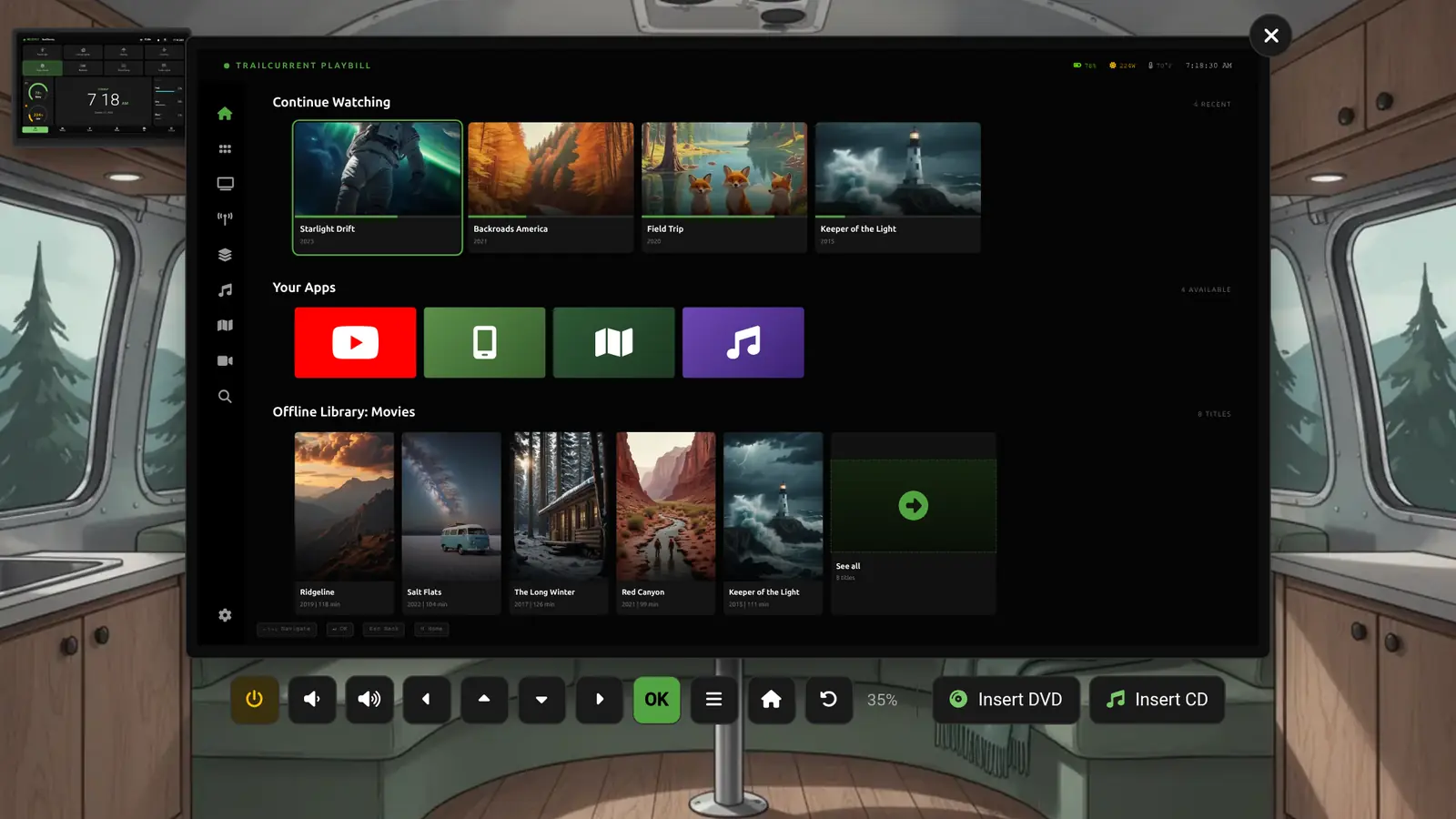
- Playbill is the TV in the living space, and the computer behind it.
- Peregrine is the voice assistant. All you see of it is a round speaker on the kitchen counter and the living space table. Say "Hey Peregrine" and ask.
- Fireside is the screen you take outside.
The modules doing the real work
Those six are the part you touch. None of them would have anything to show, or anything to switch, without the modules tucked behind the walls and under the floor. Those modules measure what is going on in the rig and do the actual switching. Every screen, the dial and the speaker simply show what the modules report and ask them to act.
- Switchback switches the things that draw power: the lights, the water pump, the vent fan, the awning light. Tap a tile, turn the dial or ask Peregrine, and it is Switchback that actually flips the switch.
- Solstice reads your solar charge controller and battery monitor, so every screen knows the battery level, the solar coming in and how long you have left.
- Reservoir measures the fresh, grey and black tanks.
- Borealis watches the air: temperature, humidity and air quality.
- Plateau measures how level the trailer sits. That is what Fireside is showing while you add blocks.
- Bearing knows where the trailer is.
- Picket knows when a door or cabinet opens. That is where the storage door alert comes from.
In the middle sits Headwaters, the small computer that ties it all together. It gathers what the modules report and carries your commands back to them, which is why every device agrees with every other device.
This is what one experience really means. There are many ways to look at the rig and talk to it, but there is only one rig underneath. Add a new screen at any time and it plugs into the same modules everything else already uses. You can see every module on What's Inside.
A day at camp, one rig
The best way to see a unified experience is to follow a normal day and notice how little you have to think about which device to use.
Making dinner
In the kitchen, your phone is on the counter, the dial sits by the sink, Milepost is on the wall and Peregrine's speaker sits at the end of the counter. Turn the water pump on from any of them and the faucet runs, the fresh tank starts to drop and the grey tank starts to fill on every screen that shows them.
Hands full? Just ask
Cooking with both hands busy is exactly when you do not want to reach for a screen. That is what Peregrine is for. Open its speaker and pick something to say: "Hey Peregrine, turn on the kitchen lights," or "Hey Peregrine, how am I doing on power?" Its ring lights up while it listens, and its answer appears as captions across the bottom of the scene, word by word, the way it would speak it.

For lights, switches and status questions, Peregrine answers instantly from the rig itself, the same way every other screen does. Ask it something else, like "give me some ideas for breakfast," and the AI that runs on Peregrine has an answer too. No internet needed for any of it.
Something changes where you cannot see it
Turn the porch light on from the kitchen, and the porch is outside. So the trailer takes you there. It steps outside first, lets you watch the light come on, and then brings you back to the kitchen with your phone still in your hand. It works the other way too: stand outside, turn on the water pump, and it takes you in to see the faucet run.

That is the unified experience in one move: you act wherever you are, and the result happens where it belongs. If you would rather stay and look around, press Stay here or open another device. Anything you choose yourself sticks.
Movie night
In the living space, Playbill is the TV. Movies and shows stored right on it, your own music, FM and AM radio, live TV from an antenna, YouTube, your iPhone's screen, and discs you can copy into the library. You can drive it with the remote, your keyboard, or your phone: in Overlook, tap More, then Playbill, and the phone becomes the remote.

Playbill also has a Rig View, a big-screen look at your battery, solar, water and air, where you can switch the lights from the couch. The same switches as the wall, the dial and the phone. Turn on the vent fan from the TV and the fan in the ceiling starts spinning.
Or do not reach for anything at all. Peregrine's speaker is on the table, so "Hey Peregrine, turn on the vent fan" works from the couch too. On a real rig, Peregrine can also work Playbill itself: tune the radio, turn the volume up or down, mute it, or tell you what is playing. That part is not in the demo yet.
Before the movie, a computer
Press power on the remote and Playbill closes. The screen turns back into a full Linux desktop: a web browser, files, documents, photos, a terminal if you want one. By day it is where you check the weather, plan the next stop or catch up on email at the dinette. By night it transforms from computer to TV. Click Playbill in the dock and the TV comes back.

Lights out
In the bedroom, Capstan sits on the nightstand. Turn it to Reading Lights and press, and the lamps on both sides of the bed come on. No phone, no reaching for a switch on the far wall.

Setting up camp
Outside, the campsite slopes. Fireside reads Not Level, so add blocks under the wheel and crank the tongue jack until the bubbles sit in the middle. The wall screen and the phone see the same numbers, so whoever is inside knows when you are done.

When something needs you
Press Trigger Alarm and the storage door alert reaches every device at once. A banner on the phone, a red ring on the dial, a note on the TV, a bell on the wall. One event, one rig, every screen.
Being straight about what you are looking at
The trailer is an example. It shows one rig set up one way, so you can get a feel for living with TrailCurrent. A few things worth knowing:
- The readings are simulated. They behave like the real thing. The clock keeps your local time, the solar follows the sun, and the battery drains with what you switch on. But nothing is connected to a real trailer. In a real rig, those numbers come from the modules above.
- The movies, songs, channels and stations are made up. The posters and album covers are placeholder art. Your Playbill shows your own library and whatever your antenna picks up where you are parked.
- Some of Playbill needs extra hardware. Live TV needs an antenna and a TV tuner. Radio needs a small USB radio receiver. Discs need a disc drive.
- Capstan's Climate screen does not change your heat yet. You can dial in a temperature in the demo, and the real dial shows the real inside temperature, but the thermostat control it will talk to is still being built.
- A few Overlook screens are pictures. The map, trails, cameras, settings, and the Driving and Storage modes show what those screens look like, but you cannot tap around inside them yet.
- Peregrine talks out loud. In the demo its replies are written out as captions. The real one speaks them, and its answers to general questions like breakfast ideas will vary, since they come from its built-in AI.
- Fireside is portable. In the demo it hangs outside the trailer. The real one runs on a battery and lifts out of its cradle, so it goes wherever you go.
If something you care about is not in the trailer, that does not mean TrailCurrent cannot do it. Ask us on Discord and we will tell you plainly.
Start with one, end up with one rig
Here is what the trailer is really for. Whatever you build first joins the same experience as everything you add after it. Every module you add makes every screen you already have more useful: add Solstice and the wall, the dial, the phone and the TV all know your battery. Every screen you add works with the modules you already have: add a Capstan later and it already knows your lights, add Playbill and the TV already knows your water, add Peregrine and you can simply ask. Nothing gets replaced, and nothing has to be learned twice.
TrailCurrent has three goals. Build a real open source Software Defined Vehicle platform. Give it away. Teach others to do the same. This trailer is the second goal in action: you should be able to see exactly what you would be living with before you put a dollar or a weekend into it. Every device in it is its own open source project on GitHub, built mostly from off-the-shelf parts. Read more about Milepost, Capstan, Playbill and Peregrine.
Go spend a day in the trailer, and when you are ready, see how to get started. More of the build goes up on the open source channel.